Whatnot giveaway bot: automatic giveaway entries on your own PC
WhatnotBot is a Whatnot giveaway bot for Windows. It runs the Whatnot app on virtual Android phones on your own PC, scans live shows and enters giveaways for you, around the clock. You pick the categories and how many bots to run, and watch every bot on a live dashboard.
What a Whatnot giveaway bot does
Whatnot giveaways are free to enter, run for up to five minutes and happen live inside shows. Catching them by hand means being in the right show at the right moment, again and again. A giveaway bot does the watching for you: it scans live Whatnot streams, finds giveaways and enters them, so your entries keep going while you are away from the screen.
The bot does not change how winners are chosen. Whatnot picks every winner at random and announces it in the show. What a bot changes is how many giveaways you enter. For how the giveaways themselves work, see how Whatnot giveaways work.
How WhatnotBot works
- It runs on your PC. WhatnotBot starts Android emulators (virtual phones) on your own Windows computer, one phone per bot.
- It uses your own accounts. You sign in to Google and Whatnot yourself, on the virtual phone. WhatnotBot does not ask for your passwords.
- It scans and enters. Each bot looks through live Whatnot streams in the categories you picked and enters the giveaways it finds.
- It heals itself. Frozen phones and crashed sessions restart automatically, so the bots keep going overnight.
- It shows you everything. A live dashboard shows entries, wins, scans, CPU and RAM for every bot.
- It stays out of your way. The bots run at low priority, so you can keep using your PC.
WhatnotBot features
| Feature | What it means for you |
|---|---|
| Auto giveaway entries | Scans live Whatnot streams and enters giveaways around the clock. |
| Run many bots | One virtual phone per bot, up to 20, as many as your PC's RAM allows. The launcher suggests the right number. |
| Pick your categories | Pokémon, sports cards, coins and bullion, sneakers, comics and more, or everything at once. |
| Live dashboard | A control panel showing entries, wins, scans, CPU and RAM for every bot in real time. |
| Self-healing | Frozen phones and crashed sessions restart automatically. |
| Your license, your PC | Your code is locked to your own PC and checked offline. Nothing is sent to the developer while the bots run. |
Real results from real runs
These numbers come from a 24-hour run with 11 bots on one PC. In a separate 6-hour run, 6 bots won 15 giveaways. The screenshots are from the dashboard, with usernames hidden.
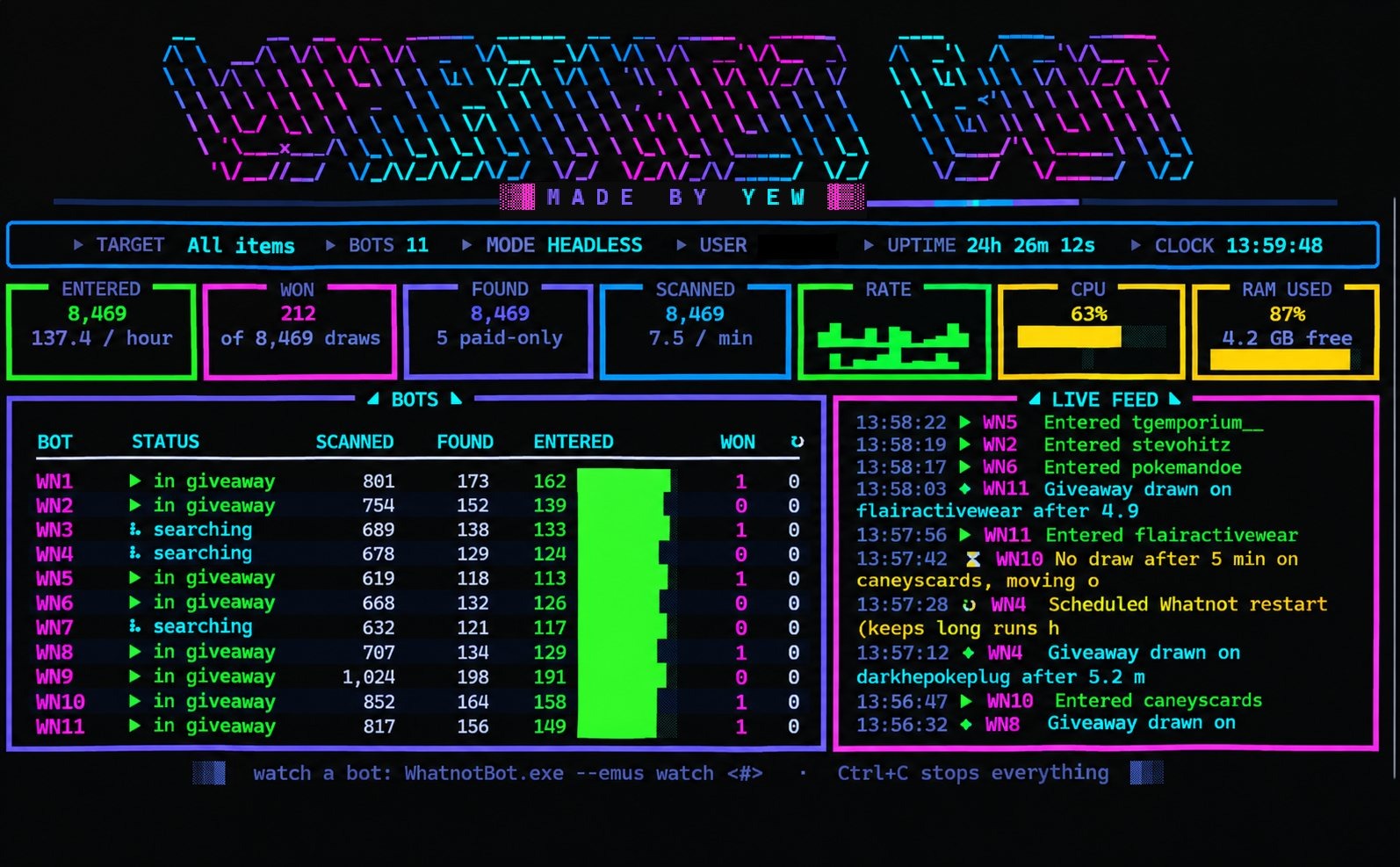
Results depend on your bot count, categories, PC and how many giveaways are live. Wins are never guaranteed.
Who it is for, and who it is not
WhatnotBot suits people who want to enter a lot of Whatnot giveaways across categories such as Pokémon, sports cards, coins and bullion, sneakers and comics, and who have a Windows PC that can run virtual phones. You need Windows 10 or 11 (64-bit), at least 8 GB of RAM for one bot, virtualization switched on in the BIOS, a Google account and a Whatnot account. The full list is on the requirements page.
It will not run on Mac (including Apple Silicon), Linux or ChromeOS, and most cheap RDP or VPS servers will not work because they do not allow the virtualization the phones need.
What WhatnotBot costs
Every plan is the same bot. You are only choosing how long you have it for, and each plan allows up to 20 bots on your PC.
| Plan | Price (USD) | Was | Length |
|---|---|---|---|
| Weekly | $25 | 1 week | |
| Monthly | $60 | 1 month | |
| Lifetime | $495 | No end date |
Prices can be shown in US dollars, pounds or euros in the Discord. See the pricing page for what each plan includes.
Your accounts and your PC
Everything runs locally on your PC. Your license code is locked to your own machine and checked offline, and nothing is sent to the developer while the bots run. You sign in to your own accounts on the virtual phone, so no one else ever holds your login. If you change or reset your PC, message the developer in the Discord to move your license.
Whatnot's rules and your risk
Read this before you buy. WhatnotBot is an independent tool. It is not affiliated with, endorsed by or connected to Whatnot Inc. Whatnot's own rules apply to your account. Its Help Center says giveaway winners are picked at random by Whatnot, and its giveaway policy tells sellers to report suspected programmatic entry as giveaway abuse so that Whatnot can review it. Whatnot can also suspend a user's eligibility to enter giveaways for breaking its terms or giveaway rules. Read Whatnot's giveaway policies and its Terms of Service, decide for yourself, and use WhatnotBot at your own risk. Nothing on this site is a promise that you will win or that your account will be unaffected.
Frequently asked questions
What is a Whatnot giveaway bot?
A Whatnot giveaway bot is software that finds live giveaways on Whatnot and enters them for you. WhatnotBot does this on your own Windows PC, using the Whatnot app on virtual Android phones that you sign in to yourself.
Does WhatnotBot work on Mac?
No. WhatnotBot needs Windows 10 or 11 (64-bit). It does not run on Mac (including Apple Silicon), Linux or ChromeOS, and most cheap RDP or VPS servers do not allow the virtualization it needs.
Do I have to give you my Whatnot password?
No. You sign in to Google and Whatnot yourself, on the virtual phone running on your own PC. Never send your password to anyone.
How many giveaways can it enter?
That depends on your PC, your bot count, your categories and how many giveaways are live. In the run shown on this page, 11 bots entered 8,469 giveaways in 24 hours (about 347 an hour) and won 212. Results vary and wins are never guaranteed.
Is it allowed by Whatnot?
WhatnotBot is independent and is not affiliated with Whatnot Inc. Whatnot's giveaway policy treats suspected programmatic entry as possible giveaway abuse that sellers can report, and Whatnot can suspend a user's eligibility to enter giveaways for breaking its rules. Read Whatnot's terms and decide for yourself. You use WhatnotBot at your own risk.
What does it cost?
Plans start at $25 a week. Monthly is $60 and lifetime is $495. Every plan is the same bot; you are only choosing how long you have it. See the pricing page for the details.